Showing posts with label rom. Show all posts

Friday, September 23, 2016

rom lolipop untuk samsung galaxy core 2 SM G355H M cm12 1

rom lolipop untuk samsung galaxy core 2 SM G355H M cm12 1


ROM LOLIPOP UNTUK samsung galaxy core 2 SM-G355H/M

gue mau bagi-bagi rom untuk samsung galaxy  core 2 SM-G355H/M nih. kalau mau nyoba silahkan ,tanpa panjang lebar silahkan download saja di link dibawah ini

ini  rom lolipop (5.1)
rom lolipop samsung galaxy core 2 SM-G355H/M
gapps 12.1
cwm
root android samsung galaxy  core 2 SM-G355H/M
bug : tidak ada

 cara root samsung galaxy  core 2 SM-G355H/M bisa dibaca disini atau disini

langkah instal , pastikan hp anda sudah di root dan minimal baterai anda 50% :
1.download dulu ke 3 file diatas .
2.setelah download semua ,pindahkan file  yang didownload tadi ke memory internal anda
3.backup data penting anda
4. setelah semuanya sudah matikan hp anda
5.setelah mati tekan power-home-volume up secara bersamaan sampai hp hidup
6.setelah itu anda akan disajikan tampilan sebuah program , di program itu anda hanya dapat menggunakan tombol volume up dan down untuk menggerakan dan tombol power untuk ok
7.pilih instal zip kemudian internal zip kemudian pilih lokasi file cwm yang tadi di download kemudian instal dan tekan yess untuk install
8.setelah selesai hapus seluruh data dengan cara menekan wipe chace partition dan wipe data
9.setelah selesai instal rom lolipopnya dengan langkah yang sama seperti diatas
10.kemudian jika sukses anda instal gappsnya ( ingat gapps wajib diinstal .karena disitulah playstore ada)
11.reboot hp anda dan tunggu hingga selesai
12.hp siap digunakan
ini screen shot lolipopnya:
Hasil gambar untuk screenshot samsung galaxy core 2 lollipopHasil gambar untuk screenshot samsung galaxy core 2 lollipopHasil gambar untuk screenshot samsung galaxy core 2 lollipop
jika anda merasa terbanti atau ada link yang salah atau tidak berfungsi bisa langsung comntar dibawah .terimakasih

download now

Thursday, September 15, 2016

Download Xiaomi Mi 4 6 0 Marshmallow Custome Rom

Download Xiaomi Mi 4 6 0 Marshmallow Custome Rom


Hello Friends Now You Can Download Xiaomi Mi 4 6.0 Marshmallow Custome Rom Without Spend Money..........

Now you can update Xiaomi Mi 4 to android marshmallow 6.0.But how?Here is the Android Marshmallow 6.0 rom for MI 4, A custom rom build by IVAN of MIUI form.You can download marshmallow Rom for Mi 4 as well as Mi 3 also from here.
Few Days back Xiaomi released official stable built of MIUI 7 for Mi 4,Mi 4i,Mi 4c,Mi 3,Mi Note Pro,Mi Note,Redmi 1s,Redmi 2/2s,Redmi Note 3g/4g,Redmi Note 2 Xiaomi device You can Check the Guide here On how to install Stable MIUI 7 in any Xiaomi devices.

install-android-marshmallow-in-mi4

Coming back to android Marshmallow 6.0 preview rom for Mi 4. IF you tired of using MIUI roms and want to experience pure android User interface then you can install this rom based on android marshmallow in MI 4.Note that this is not Cm 13 rom.The only know bugs of this rom is Camera not work, But Video camera can be used.ROM Tested on Mi4W/C TD SIM cards Note: Doesnt work on Mi4 4G

#Requirements

1.Must have TWRP recovery installed in your Mi 4.
2.Make sure to back up your Current rom from recovery.
3.Also make backup of your personal data.
 

ScreenShot


#How To Install Android Marshmallow 6.0 for Xiaomi Mi 4


1.Download Android marshmallow rom for Xiaomi Mi 4 and Gapps for marshmallow 6.0 for it from the links given in the download section below.

2.Now place both the zip file in your internal storage.

3.Now reboot your device into twrp recovery mode by going to Tools > Updater > press Menu key and select ‘Reboot to Recovery mode’
 

4.Now you will reboot into TWRP recovery now tap on Install Zip.

5.Now navigate marshmallow rom.zip file where you pasted in the 2nd step and flash this zip file.Similarly Install gapps for 6.0.zip also

6.After flashing Rom and gaaps Clear data,Clear cache ,Clear dalvik cache.

7.Done! Now reboot your device wait for few minutes as it takes a while in first boot after finishing boot.


#Downloads 


1.Download Android Marshmallow Rom for Mi 4

2.Download Gapps for android marshmallow 6.0
 

download now

Monday, September 5, 2016

ROM LOLIPOP DAN KITKAT UNTUK SAMSUNG GALAXY ACE 2 GT I8160 cm 12 1

ROM LOLIPOP DAN KITKAT UNTUK SAMSUNG GALAXY ACE 2 GT I8160 cm 12 1


ROM LOLIPOP dan kitkat UNTUK SAMSUNG GALAXY ACE 2 GT-I8160 (cm 12.1)

gue mau bagi-bagi rom untuk samsung galaxy ace 2 gt-i8160 nih. kalau mau nyoba silahkan ,tanpa panjang lebar silahkan download saja di link dibawah ini

ini yang lolipop (5.1)
cynogen mod 12.1 gt-i8160
gapps 12.1
cwm
bug : bluthot sedikit berat
          perekam vidio berwarna hijau tetapi bisa dinormalkan dengan aplikasi lain
dan ini yang kitkat (4.4.4)
cynogen mod 11 gt-i8160
gapps 11
cwm
bug : tidak ada
tambahan
dan jika ingin dapat uang gratis dengan android 600000 per bulan asli no spam silahkan kunjungi laman ini ini sudah terbukti membayar : uang gratis dengan android
langkah instal , pastikan hp anda sudah di root dan minimal baterai anda 50% :
1.download dulu ke 3 file diatas .
2.setelah download semua ,pindahkan file  yang didownload tadi ke memory internal anda
3.backup data penting anda
4. setelah semuanya sudah matikan hp anda
5.setelah mati tekan power-home-volume up secara bersamaan sampai hp hidup
6.setelah itu anda akan disajikan tampilan sebuah program , di program itu anda hanya dapat menggunakan tombol volume up dan down untuk menggerakan dan tombol power untuk ok
7.pilih instal zip kemudian internal zip kemudian pilih lokasi file cwm yang tadi di download kemudian instal dan tekan yess untuk install
8.setelah selesai hapus seluruh data dengan cara menekan wipe chace partition dan wipe data
9.setelah selesai instal rom lolipopnya dengan langkah yang sama seperti diatas
10.kemudian jika sukses anda instal gappsnya ( ingat gapps wajib diinstal .karena disitulah playstore ada)
11.reboot hp anda dan tunggu hingga selesai
12.hp siap digunakan
ini screen shot lolipopnya:


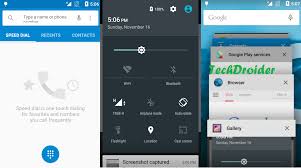
jika link diatas erorr anda comen saja dibawah dan saya akan segera memperbaikinya. ty


download now

Sunday, September 4, 2016

Download Rom Android marshmallow for Galaxy S6 S6 Edge SM G920F SM G925F

Download Rom Android marshmallow for Galaxy S6 S6 Edge SM G920F SM G925F


Download Rom (Android marshmallow) for Galaxy S6/ S6 Edge (SM-G920F/SM-G925F)


1-   Galaxy S6 (SM-G920F)


Mobile: Galaxy S6

Model: SM-G920F

System Version: Marshmallow 6.0.1
Baseband: XEF G920FXXU3DPAD


Download Rom Form Here:

 Download


2-   Galaxy S6 Edge (SM-G925F)


Mobile: Galaxy S6 Edge

Model: SM-G925F

System Version: Marshmallow 6.0.1

Baseband: XEU G925FXXU3DPAD


Download Rom Form Here:
Download


Instructions


1-     Extract (unzip) the firmware file

2-     Download (Odin v3.10.7)

3-     Extract Odin ZIP file

4-     Open Odin v3.10.7

5-     Reboot Phone in Download Mode 
     (press and hold Home + Power + Volume Down buttons)

6-     Connect phone and wait until you get a blue sign in Odin

7-    Add the firmware file to AP / PDA

8-     Make sure re-partition is NOT ticked

9-     Click the start button, sit back and wait few minutes


download now

Friday, September 2, 2016

Windows 8 custom ROM for Samsung Galaxy Y

Windows 8 custom ROM for Samsung Galaxy Y


Hello Friends Now You Can Download Window 8 Custom Rom For Samsung Galaxy Y Without Any Problem.....


Windows-8-rom-samsung-galaxy-y-photos


The Samsung Galaxy Y S5360 is normally comes with Android 2.3 Gingerbread as an Operating System. There is no official Android 4.0 Ice Cream Sandwich upgrade from Samsung mobile Support. Because the phone’s hardware configuration is not supported for the upgrade. The Phone is comes with 800 MHz processor, 3.2 Mega pixel camera, Capacitive touch Screen. Galaxy Ace s5360 is capable to run Windows phone 8 custom ROM.

WARNING:

  • We are not responsible for any damages that may happened due to using this ROM. If any problem happens that related to installing, we will help you to solve it.
  • Use this guide at your own risk. We shall not have any liability or responsibility for whatever happens to you and your device by using the instructions in this guide.
  • The instructions provided in this tutorial for educational purpose only. There is no guarantee that these steps will work for your device.
  • The steps given in this tutorial is only to use with Samsung Galaxy Y and the model number is S5360. Applying this guide to any other device or any other model may produce many problems.
  • Read and Understand the whole tutorial first, before going to perform the steps.

PRE REQUIREMENTS:

  • First your mobile must be rooted. Check this – How to Root Samsung Galaxy Y GT-S5360 (rooting procedure in the end of post)
  • Then install ClockWorkMod custom Recovery. Check this – ClockWorkMod Recovery on Samsung Galaxy Y
  • We recommend you to take a backup of the data in your phone. After installing the ROM, all the files and data will be deleted.
  • SMS – Backup Messages
  • Contacts – Sync with Gmail App
  • Videos, Images, Songs and Other Files – Copy to internal / External SD card or System
  • APN Settings – Take Manual Note from “Settings > Wireless & Networks > Mobile Networks > Access Point Names
  • Then maintain minimum 60% charge in your phone’s battery. This will help you to don’t get switched of your phone.
  • And disable any antivirus and firewalls too.

HOW TO INSTALL MONOCHROMATIC WINDOWS 8 ROM ON SAMSUNG GALAXY Y:

  • Download the ROM Monochromatic WP8 5.7.1 SYNERGY (NO KERNEL).zip – Here
  • Then connect your phone with PC using USB cable and transfer the downloaded file to your mobile’s SD card.
  • After that disconnect your phone from Computer.
  • Switch off your phone and reboot in recovery mode.
  • To open recovery mode in your mobile, press HOME + VOLUME UP + POWER button together.
  • You can use Volume Up and Down keys to navigate and Home button to select an option.
  • Then do wipe data/factory reset, wipe cache, dalvik cache and format cache, format data, format system in the recovery.
  • After that, select “Install Zip from SD card” then in next page select “Choose zip from SD card”
  • Then select the downloaded zip file. And in next page confirm the selection.
  • Wait for the process finish.
  • In few minutes your phone will display a message completed in recovery mode.
  • After that, select “Go back” option and then “reboot system now” to reboot your device.
  • Note: First time boot will take some long time. It will install the ROM updates on first time restarting phone. It takes some minutes to show the home screen on first time.

download now

Friday, August 12, 2016

Backup ROM Firmware V GEN C1 Asli

Backup ROM Firmware V GEN C1 Asli


 FULL SPECIFICATION V-GeN C1

GENERAL    
2G Network : 850 / 900 / 1800 / 1900 ( SIM 1 & SIM 2 )
3G Network : WCDMA 850 / 2100
SIM                  : Dual SIM (Mini-SIM + Micro SIM, dual stand-by)
Announced  : 2014. April
Status             : Available. Released 2014, April

BODY  
Dimensions : 140 x 73 x 8.5 mm
Weight           : 168 gr

DISPLAY    
Type              : IPS Capacitive touchscreen, 262K colors
Size               : 960 x 540 pixels (QHD), 5.0 inches (~240 dpi)
Multitouch : Yes

SOUND    
Alert types      : Vibration, MP3 ringtones
Loudspeaker : Yes
3.5mm jack    : Yes

MEMORY  
Card slot   : microSD, up to 32 GB
Internal    : 4 GB ROM, 1 GB RAM

DATA    
GPRS       : Yes, class 12
EDGE       : Yes
Speed       : HSDPA (up to 21,1Mbps), HSUPA (up to 5.6Mbps)
WLAN       : WIFI 802.11b/g/n, Wireless AP
Bluetooth  : Yes, v2.1 with A2DP
USB       : Yes, microUSB v2.0

CAMERA  
Primary      : 5 MP, 3264 x 2448 pixels, AF, Flash light
Features     : Voice capture, touch focus, face detection, Smile shot, HDR
Video           : Yes, 1080p@30fps
Secondary  : Yes, 2 MP 1600 x 1200 pixel

FEATURE  
OS       : Android OS, v4.2.2 (Jelly Bean)
Chipset       : Mediatek MT6582
CPU       : Quad-core A-7 1.3 GHz
GPU       : Mali-400MP
Sensors    : Light Sensor, proximity, Distance Sensor
Messaging  : SMS(threaded view), MMS, Email
Browser       : HTML5
Radio       : FM radio
GPS       : Yes, with A-GPS support
Java       : Yes
Colors       : White& Black
- V-GeN App Store- V-Guarantee
- SNS integration
- Google Search, Maps, Gmail, Talk
- Audio / Video Player- MP3/WAV/eAAC+ player
- MP4, ASF, RM, RMVB
- Organizer
- Document viewer
- Photo viewer + editor
- Predictive text input

BATTERY       :
Li-Ion 1900mAh battery
Stand-by   : Up to 48 hours
Talk time  : Up to 3  hours
WARRANTY   :  2  years (1 year Full Service Spare part and 1 year service)

Diatas adalah spesifikasi V-Gen C1
nah, jika anda ingin ROM V-gen C1 silahkan download Backup-pan ROM Firmware Asli V-GEN C dibawah ini :

Download Part 01
Download Part 02
Download Part 03
Download Part 04
Download Part 05
Download Part 06
Download Part 07
Download Part 08

 Password : f4thur

Link diatas saya dapat dari blog sebelah..
Jika ada pertanyaan silahkan tulis komentar anda dibawah...
Untuk Video Tutorial ini saya search di google.. saya belum sempat buat, dikarenakan masih sibuk nyusun tugas akhir. Terima Kasih..


Berikut aplikasi yang saya pakai
Download >>> FlashTool
Download >>> MT65x3 USB Driver

download now

Monday, August 8, 2016

ROM V Gen Zeus S1

ROM V Gen Zeus S1


Harga V-Gen Zeus S1 – Smartphone Android Octa Core satu persatu muncul kepasaran, setelah Himax Pure III dan Imo Clarity kali ini giliran V-Gen S1 yang akan menyapa publik Indonesia yang membutuhkan Smartphone Android berspesifikasi Octa Core dengan harga yang terbilang cukup murah.
Anda sendiri pasti sudah tak asing mendengar nama V-Gen, produsen MicroSD tersebut rupanya latah mengikuti produsen teknologi lainnya yang ikut meluncurkan Smartphone Android. Industri ponsel yang sangat subur memang membuat banyak perusahaan yang mencoba peruntungannya untuk bersaing dengan vendor besar yang sudah ada saat ini.
Memang tak mudah untuk mengalahkan vendor besar semisal Samsung, Sony, LG, dan HTC, apalagi mereka sudah bertahun-tahun dalam memproduksi handphone-handphone berkualitas. Memang butuh kepercayaan konsumen agar di terima dipasaran, dan dengan modal brand V-Gen yang sudah besar, tentu bukan hal yang sulit bagi Smartphone Android V-Gen agar bisa diterima dipasaran.
Di tambah service center yang merata dan pendistribusian barang yang baik, anda akan dengan mudah menjumpai ponsel ini dipasaran, terlebih sudah banyak toko online yang menawarkan harga khusus bagi anda yang tertarik membeli ponsel ini, dan bagi anda yang tertarik mebmeli ponsel Octa Core dari V-Gen tersebut, silahkan simak informasi Spesifikasi Dan Harga V-Gen Zeus S1 yang sudah dirangkum redaksi hariangadget.com Spesifikasi Dan Harga V-Gen S1

Berikut ini adalah ROM V-Gen Zeus S1 yang telah saya dapat dari Forum sebelah
Silahkan Download ROM V-Gen Zeus S1

Install ROM :
- Unpack FlashTools, and Click on Flash_tool.exe
- Select a the MT6592_Android_scatter_emmc.txt in ROM
- Wait file to be added into Flash Tool
- choose Option->USB Model,click USB Model
   –> Choose Option->DA DownLoad All->Speed->High Speed, click High Speed
- Turn off your phone, remove the battery.
- "Press F9 (hit Download button)" OR " if upgrade ROM Firmware->Upgrade "
- and connect your phone into the computer via USB data cable.
- The process will start and a red progress bar will appear after color purple, yellow.
- And green circles display
- Finish !
- You can now safely disconnect your phone and turn it on.

DESCRIPTION :
ROM Mobile V-GeN S1 Zeus - ROM Android 4.2.2  
ONLY MT6592
Official ROM V-GeN S1 Zeus version: 2706_v92_cxq1_s1_20140414
Gapps include – No Rooted
Language support: Multilang

download now