Showing posts with label technical. Show all posts

Thursday, September 29, 2016

Cara Install Windows 10 Technical Preview

Cara Install Windows 10 Technical Preview


Anda dapat menginstal Microsoft Windows 10 Technical Preview dari Windows Anda gunakan saat ini, atau dual boot, Ada cara termudah dan paling aman untuk mencoba platform baru yaitu dengan mesin virtual. Dengan menggunakan alat bantu gratis seperti Oracle VM Virtual box, Anda dapat membuat komputer yang berjalan di Windows pada desktop Anda, memungkinkan Anda untuk bereksperimen tanpa meninggalkan OS lama.
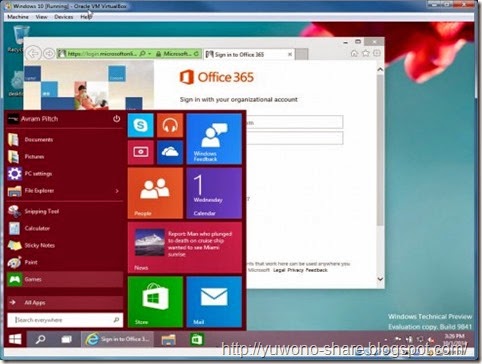
Windows 10_h
Jika Anda belum memiliki Installer Windows 10 Technical Preview silakan download DISINI
1. Setelah download silakan buat installer via Flasdisk / DVD
2. Boot First seperti biasa via media setup Flasdisk / DVD
3. Klik Next pada layar yang menunjukkan pilihan wilayah & bahasa Negara Anda.
Windows 10_i
4. Klik Install Now
Windows 10_j
5. Accept the license terms dan klik Next.
Windows 10_k
6. Pilih Custom install.
Windows 10_l
7. Klik Next, pilih Drive.
Windows 10_m
Tunggu beberapa menit, sedang copy file installasi. Anda tidak perlu melakukan apa-apa selama proses ini, tetapi Anda akan melihat bahwa perangkat lunak akan restart dan terus menyalin file selama beberapa menit. Ini akan reboot untuk kedua kalinya sebelum Anda diminta untuk klik setiap tombol lagi.
8. Click Use express settings.
Windows 10_o
9. Sign in to your Microsoft account atau buat baru.
Windows 10_p
10. Verifikasi account Anda dengan memasukkan salah alamat email atau nomor telepon. Anda akan dikirim kode untuk masuk.
Windows 10_q
Windows 10_r
11. Pilih “Set this up as a new PC” jika diminta untuk pengaturan impor dari komputer lain yang terkait dengan akun Anda. Klik Next.
Windows 10_s
12. Klik Next untuk akses ke OneDrive.
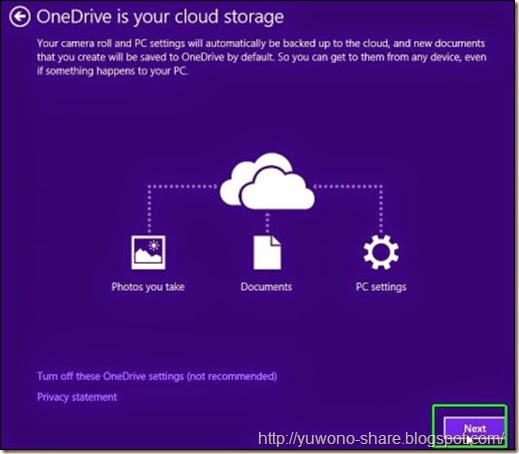
Windows 10_t
Windows akan memakan waktu beberapa menit untuk menginstal aplikasi untuk Anda dan mempersiapkan account Anda.
Windows 10_u
Setelah itu, Anda akan dibawa ke Windows 10 desktop, yang siap untuk Anda untuk mulai menggunakannya.
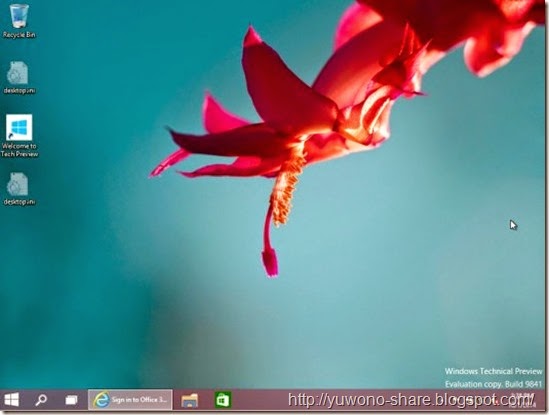
Windows 10_v
Selesai….


Special Thanks to Anak Rantau
Yuwono-share.blogspot.com

Tags :
Download windows 9 full version , download windows 9 , download windows 9 free full version , download windows 9 iso full version , download windows 9 iso free full version , download iso windows 9 , download iso windows 9 free full version , download windows 10 , download windows 10 free , download windows 10 free full version , download windows 10 iso full version , download windows 10 iso free full version , download iso windows 10 , download iso windows 10 free full version , download windows 10 free with serial number , download serial number windows 10 terbaru , download windows 10 full with serial number , download key windows 10 free , download key windows 10 full version , cara install windows 10 , cara instal windows 10 orignal , download key windows 10 original  download serial number windows 10 original , download serial number windows 10 original free , download key windows 10 original free , download serial number full windows 10

download now

Friday, September 16, 2016

Download Windows 10 Technical Preview ISO x86 dan x64

Download Windows 10 Technical Preview ISO x86 dan x64


Windows 10 Technical Preview
Sebelumnya saya sebagai penulis di blog Newospc ini meminta maaf karena sudah sekian lama tidak mengupdate tulisan dikarenakan berbagai kesibukan saya sendiri. Kali ini saya akan membahas tentang Windows 10 Technical Preview. Pasti dari anda sudah mengetahui keberadaan os ini. Os buatan Microsoft Corporation ini sangat banyak menyedot perhatian publik karena telah ditunggu-tunggu kehadirannya. Meskipun masih preview atau masih dalam masa percobaan, Windows 10 sangat dicari banyak orang yang ingin mencobanya. Windows 10 Technical Preview berada pada build 9841. Sebenarnya os ini diperuntukan bagi para developer agar dapat dipelajari dan menemukan bugs pada os ini, tapi saya akan membagi os ini kepada anda secara gratis, Dan langsung saja kita liat reviewnya sekarang.

Screenshoot :


System Requirements :
  • Processor: 1 gigahertz (GHz) or faster
  • RAM : 1 gigabyte (GB) (32-bit) or 2 GB (64-bit)
  • Free hard disk space : 16 GB
  • Graphics card : Microsoft DirectX 9 graphics device with WDDM driver
  • Internet Connection (Optional, just for updates)

What’s New Features in Windows 10 ?
  • Start menu: The familiar Start menu is back, but it brings with it a new customizable space for your favorite apps and Live Tiles.
  • Everything runs in a window: Apps from the Windows Store now open in the same format that desktop apps do and can be resized and moved around, and have title bars at the top allowing for maximize, minimize, and close with a click.
  • Multiple desktops: Create desktops for different purposes and projects and switch between these desktops easily and pick up where you left off on each desktop.
  • Find files faster: File Explorer now displays your recent files and frequently visited folders making for finding files you’ve worked on is easier.
  • New task view button: There’s a new task-view button on the taskbar for quick switching between open files and quick access to any desktops you create.
  • Snap enhancements: You can now have four apps snapped on the same screen with a new quadrant layout. Windows will also show other apps and programs running for additional snapping and even make smart suggestions on filling available screen space with other open apps

Download Link :

Windows 10 Technical Preview ISO x86 ( 2.9 GB ) | Single |
Windows 10 Technical Preview ISO x64 ( 3.8 GB ) | Single |

Update Link!!!

Windows 10 Technical Preview build 10041 ISO x86 ( 2.5 GB ) | Single |
Windows 10 Technical Preview build 10041 ISO x64 ( 3.4 GB ) | Single |


Product Key :

NKJFK-GPHP7-G8C3J-P6JXR-HQRJR

Video :


download now

Friday, August 26, 2016

download gratis Windows 10 Technical Preview 64bit Build 10049

download gratis Windows 10 Technical Preview 64bit Build 10049


Windows 10 Technical Preview (64bit)

Windows 10 Technical Preview (64bit) Build 10049

  4.6 System Tuning by Microsoft Corporation
Situs Download Software dan Games Gratis, Aplikasi Android APK dan Games APK Gratis, Tips dan Trik, Berita Gadget dan Informasi Teknologi Dunia Terbaru Hanya di JalanTikus.com
Download 
 Share  Share  Tweet

Deskripsi

Windows 10 Technical Preview 64 bit adalah Produk baru dari Microsoft, melanjutkan generasi sebelumnya, Windows 8. Kembalinya Start menu di Windows 10 ini membuat banyak orang antusias akan kedatangannya, Download Windows 10 Technical Preview di www.akorvio2.blogspot.com
Serial Number: NKJFK-GPHP7-G8C3J-P6JXR-HQRJR
Di Windows 10 Technical Preview versi terbaru ini, terdapat pencarian Cortana dan Browser terbaru dari Microsoft yang digadang-gadang sebagai pengganti dari Microsoft Internet Explorer yang mereka beri nama Project Spartan.

download now

Tuesday, August 23, 2016

Download Windows 10 Technical Preview ISO 32 bit dan 64 bit

Download Windows 10 Technical Preview ISO 32 bit dan 64 bit


Jika Anda tidak bisa menunggu untuk menempatkan Windows 8 di belakang Anda dan Anda adalah tipe petualang sekarang Anda dapat men-download Windows 10 Technical Preview dan Windows Program Insider sekarang hidup.


Seperti yang kita lihat, Microsoft telah membuat "modern UI" semua tapi menghilang pada desktop dan pindah ke menu awal dibangkitkan. Yang memungkinkan pengguna lebih akrab. Ini juga menandai pertama kalinya virtual desktop telah dipanggang ke dalam Windows, dan Anda dapat beralih di antara melalui thumbnail di taskbar.


Beberapa fitur sebelumnya dari versi agak membenci, seperti pesona dipertahankan, namun Microsoft mengatakan bahwa hampir semuanya berubah sebelum meluncurkan akhir tahun depan. Jika Anda siap untuk men-download silahakan dibawah ini.

Windows 10 Technical Preview x86 (2.9GB ISO)

Windows 10 Technical Preview x64 (3.8GB ISO)

Atau Disini Download Windows 10 Technical (32-bit dan 64-bit)


download now

Thursday, August 18, 2016

Technical Preview Of Windows 10 Installation And Ten Key Words

Technical Preview Of Windows 10 Installation And Ten Key Words


Technical Preview Of Windows 10 Installation, And Ten Key Words


Microsofts new operating system, Windows 10, a technical preview version for developers has been submitted. Before the final release of Windows to Microsoft for bugs discovered it presents for computer experts. Experiment they are aware of the flaws in Microsoft. The accuracy of these flaws it is presented to the general public. The preview version of Windows 10 if you intend to install install it on your own responsibility. For any errors in it you could cause major damage.
Let us build 9841 of Windows 10 versions available of which ten are aware of these things before you know it must be established.


This is for experts


ISO file if you do not know what that is, you have to test Windows Virtual PC is not amaysy or do not install it. Microsoft says that if you are not a computer expert, the most basic version will not enjoy at all. It can be a lot of bugs which could crash the system. Therefore, it is currently not install at all to full use.


Backup before installation


If you have Windows 10 installed on your computer in everyday use are going to get better once thought. The first complete system backup of your data, including themselves. So to avoid any damage in case of malfunction. If you install Windows 8 on the PC if you do not have any compatibility problems are likely to face.


Windows Insider participation in the program


If you want to try Windows 10, a computer specialist for the Windows Insider program (Windows insider program) to be joined to the following link:


https://insider.windows.com/

Since joining the program test version of Windows ready and you will be notified. I can correct them in this preview version is presented again and again. Instead of joining the program, you have to help Microsoft. The experience of Microsoft Windows 10 you have to know what it was and what improvements can be made.


Windows 10 ISO size


Windows 10 ISO file size is approximately four GB. It also depends on the thirty-two or sixty-four bit versions are free. Because both are of different sizes. The Language Packs are used in both versions, such as US English, UK English, Chinese and Portuguese. Windows 10 key please note:


NKJFK-GPHP7-G8C3J-P6JXR-HQRJR


ISO file to download, visit the following link:


windows.microsoft.com/en-us/windows/preview-iso


Technical Preview Of Windows 10 Installation, And Ten Key Words


Enterprise version of Windows 10 you should go to the link:


https://technet.microsoft.com/en-gb/evalcenter/dn781239.aspx?ocid=wc-mscom-wol


Enterprise technical preview version of Windows 10 and the thirty-four-bit versions of the ISO file is available for downloading.


For a limited time


The final release of Windows 10, but also the technical preview version of the Beta version will be presented. April by Microsoft technical preview users to upgrade any given reminders.


Setting


While Windows 8.1 to Windows 10 if you are going to install it easily mount the ISO file and can run setup.exe. While on any other version of Windows you are going to install the ISO file to a USB flash drayyupr will burn.


During the installation files will be stored


If Windows 10 installed on a Windows machine seam or Associate kryntu "Keep Windows settings, personal files, and apps through the Windows settings option, the personal data and installed applications remains can be placed. But if the machine is installed on a Windows Vista clean installation of Windows 10 would be. Yes, like all of Microsoft Vista more like themselves!


Technical Preview Of Windows 10 Installation, And Ten Key Words


Hardware requirements


If your computer can run Windows 8.1 on Windows 10 technical preview can also be installed. 1GHz or faster processor, 1 GB memory for thirty-two bit and four-bit memory will be required to 2GB. The 16GB drive space must be present.


Limited to touch-screen features


Windows 10 technical preview also works with touch screen devices, but it is not a full version for errors that may touch.


Return is impossible!


If you have Windows 10 installed from the recovery partition can not downgrade back to Windows 8.1. Whether you have a recovery partition did not exist, after the installation of Windows 10, Windows will not serve to store recycled. The Windows 10 operating system to move back to the old for the new installation would be.
****


Windows 10 with Windows 7 or 8 Install


Lets preview of Windows 10 installation by a technical move. As we mentioned before, do not install it on a computer for everyday use. If you want to try it, it will install in a virtual machine. Boot the computer using Windows, you can choose which one to go.
Well before the start of the installation lynkh sure you have a backup of your files. Although our guide through the installation of Windows 10 installation files you will not hurt yourself but Windows 10 is no big damage. Therefore we recommend that the backup is better precautions.


Make space for installation


Hard disk space for the Windows 10 would have to. But it is more likely that there will be a hard disk in your system on which you install Windows 10 with sutures or associate would be going to.
Windows 10 C drive space for installation of a new partition will use. If you have any additional base near GB partition is formatted so it can be used for installation. If you do not have any empty partition of a large partition by changing the size of the space you can get. The space for the installation of Windows 10 will be brought to work.
Whether youre using Windows Seven or Eight, to change the size of the disk partition management utility can use. Run down the open windows + R keys and type in diskmgmt.msc and press Enter.


Technical Preview Of Windows 10 Installation, And Ten Key Words


Then open Disk Management to reduce the size of the partition and click on this option, click Shrink Volume.


Technical Preview Of Windows 10 Installation, And Ten Key Words


According to Microsoft as Windows 10, Windows Eight hard disk space is required. Sixty-four-bit version of Windows 8.1 almost twenty GB of space is supposed to. While the small base GB partition separating take over the space.


Technical Preview Of Windows 10 Installation, And Ten Key Words


Installation Disk


Windows 10 ISO file to DVD and burn can be Boot USB flash drive can be made. Windows Seven USB / DVD Download tool for the job is still active. This tool ISO file of Windows 10 DVD or USB flash drive as an installation disc and moves on. This tool can be downloaded from the following link:


http://wudt.codeplex.com/


Technical Preview Of Windows 10 Installation, And Ten Key Words


Installing Windows 10


Installation DVD or USB drive into the computer system set up to start relays. System automatically boot from the Windows Installer will be 10. If it does not change the BIOS boot order setting will need to be able to boot the system installation.
After starting the installation process language and keyboard layout after selecting "Install now" button, you can click on


Technical Preview Of Windows 10 Installation, And Ten Key Words


After accepting the license Agri minutes on stage to select the installation type "Custom: Install Windows only (advanced)" Choose. If the first option upgrade to make it seam or associate an existing Windows 10 technical preview version of Windows will upgrade. The custom option before Windows 10 will be maintained with the copy of Windows.


Technical Preview Of Windows 10 Installation, And Ten Key Words


You "Where do you want to install Windows?" Will be taken. To the partition you want to install Windows 10, it will be selected.


Technical Preview Of Windows 10 Installation, And Ten Key Words


Management of the disk space through which we had here "Unallocated Space" will be present in the form. Click on New to select the space, so the space could be made the new partition. Which will open in a size box that will be asked how you want to make space. The space will be available already written, so we do not need to make any changes. Just click on the Apply button to make a new partition from which it will turn into empty space.


Technical Preview Of Windows 10 Installation, And Ten Key Words


After becoming a new partition for the installation of Windows 10 can be selected. Click the Next button, then turn down. After the installation of Windows 10 will start.


Technical Preview Of Windows 10 Installation, And Ten Key Words


After installation is complete, the system will re-start from the first technical preview of Windows with Windows 10 will also be showing its appearance. Let Windows choose what you want to use.


Technical Preview Of Windows 10 Installation, And Ten Key Words


Under "Change defaults or choose other options" through which you can select the operating system to be loaded or automated selection looks and how long it will be the default operating system.


Technical Preview Of Windows 10 Installation, And Ten Key Words


Since Windows Seven, Eight and 10 three operating systems use the NTFS file system for any other operating system files in the operating system can easily be seen. If the file exists on your windows desktop, it also can be seen in Windows 10.
If you dual-boot Windows 10 with Linux if you want to install Windows 10 must first install a Linux distribution and later. In fact, the experience of these two operating systems have a problem walking. GRUB2 install the Linux boot loader which can be selected when the system boot loading Windows or Linux. Linux already installed on Windows 10 to install it while ignoring its Linux boot loader is installed. In that case, the poor have to store 2 relays.


download now

Wednesday, August 17, 2016

Download Windows 10 Technical Preview x86 x64 ISO

Download Windows 10 Technical Preview x86 x64 ISO


Microsoft secara resmi telah mengumumkan versi terbaru merekaWindows 10. Ada banyak fitur yang terungkap dalam acara tersebut dan banyak di sana untuk memulai dengan Final Build (RTM). Windows 10 adalah kombinasi dari fitur Windows 7 dan Windows 8. Windows 10 akan kompatibel dengan semua PC yang telah terinstall Windows 7 dan 8.
Windows 10_e
Sekarang penggemar dan pengembang dapat men-download versi Technical Preview dari Windows 10 secara resmi dari Windows store. Pengguna Windows 8 dapat langsung menginstal Windows 10 sebagai upgrade.
Sebelum memulai, Anda perlu mengikuti beberapa langkah-langkah untuk men-download preview build.
  • Login ke Windows Insider Program.
  • Download file ISO dari link di bawah ini (32bit atau 64 bit)
  • Setelah men-download, burning file ISO ke media instalasi seperti DVD atau USB flash drive.
  • Install Windows seperti biasa.
Windows 10 Technical Preview Download Links
Product key: NKJFK-GPHP7-G8C3J-P6JXR-HQRJR

  • English 32-bit (x86)- Download (3.16 GB)  Hash- 73AC23AD89489855F33CA224F196327740057E2E
  • English 64-bit (x64)- Download (4.10 GB)  Hash- EB75A3D3C0F621F175B75DC65DB036D0E00EAC43


Special Thanks to Anak Rantau
Yuwono-share.blogspot.com


Tags :
Download windows 9 full version , download windows 9 , download windows 9 free full version , download windows 9 iso full version , download windows 9 iso free full version , download iso windows 9 , download iso windows 9 free full version , download windows 10 , download windows 10 free , download windows 10 free full version , download windows 10 iso full version , download windows 10 iso free full version , download iso windows 10 , download iso windows 10 free full version , download windows 10 free with serial number , download serial number windows 10 terbaru , download windows 10 full with serial number , download key windows 10 free , download key windows 10 full version

download now

Tuesday, August 16, 2016

Direct Link Download Windows 10 Technical Preview

Direct Link Download Windows 10 Technical Preview


Microsoft baru baru ini merilis Windows 10 Technical Preview untuk anda coba secara gratis dan tersedia untuk di download , Fitur baru pada Windows 10 seperti Start Menu, Virtual desktop dan ain-lain. Windows 10 dapat disownload secara cuma cuma menggunakan direct link berikut dibawah ini. Selamat Mencoba…

Processor: 1 gigahertz (GHz) or faster
RAM: 1 gigabyte (GB) (32-bit) or 2 GB (64-bit)
Free hard disk space: 16 GB
Graphics card: Microsoft DirectX 9 graphics device with WDDM driver
A Microsoft account and Internet access


  • Free Download Windows 10 Technical Preview 32-bit l 2.9 GB
  • Free Download Windows 10 Technical Preview 64-bit l 3.8 GB
Untuk Serial Number Windows 10 Technical Preview
NKJFK-GPHP7-G8C3J-P6JXR-HQRJR

download now

Sunday, August 7, 2016

Download Windows 10 Technical Preview for Enterprise ISO

Download Windows 10 Technical Preview for Enterprise ISO


Minggu ini kita semua akhirnya bisa mencoba Windows 9 “TH” langsung dariMicrosoftHanya menunggu beberapa hari lagi, Windows Technical Preview secara resmi yang diresmikan di sebuah acara di San Franciscodan kegembiraan dari penggemar Windows telah meningkatSedikit lebih cepat dari jadwal, ini adalah Link Download dari situs Microsoft untuk versi Technical Preview Windows for Enterprise. Menariknyahalaman mengacu pada versi Windows bernama WindowsTH” (ThresHold)tapi tidak jelas bahwa ini sebenarnya adalah nama yang akan digunakan atau bukan.
 Jangan terlalu semangat untuk mendapatkan Windows terbarutampaknya bahwahalaman ini hanya placeholder untuk saat ini. Tombol download saat ini di alihkan ke link versi non-update dari TechNet Evaluation Centertapi sebuah link ke halaman download Technical Preview for Enterprise akan tersedia dalam waktu dekatInimengungkapkan bahwa versi US Technical Preview for Enterprise Ukuranya :3.16 GB dan 4,10 GBKami sudah punya ide yang cukup baik dari apa yang diharapkan dari preview di mana telah ada banyak membangun dan screenshot yangbocor selama beberapa minggu terakhir.
 
Sampai sekarang telah diasumsikan bahwa nama akan menjadi Windows 9danadalah mungkin bahwa akhiran TH terkait dengan codename Threshold yang telah digunakan sejauh iniSebuah foto diposting oleh Terry MyersonExecutive Vice President Sistem Operasimemberikan sedikit lebih jauhTidak datang dalam menanggapi nama postulasi di Twitter oleh Tom Warren dari The Verge dan Mary JoFoley dari ZDNet dan menunjukkan Myerson berdiri di depan logo Windows yang baruTubuhnya mengaburkan bagian yang sangat penting dari nama, tapi Windows 9, Windows X, Windows Oneatau bahkan hanya Windows adalah nama yang itu diperkirakan akan menjadi moniker akhir. 
 
Dengan asumsi hal-hal di atas yang tidak berubah secara dramatis sejak bocoranWindows 9 yang telah kita lihatkita memiliki ide yang baik dari apa yang diharapkanKita mungkin tidak yakin tentang apa nama untuk Windows 9tetapi kita tahu menu Startdesktop virtual, dan pusat notifikasi baru tiga fitur Microsoftberharap dengan akan terlihat sebagai perbaikan atas Windows 8.x.

Apakah Anda akan menginstal Preview Teknis secepat Anda bisa, atau Anda akanmenunda sampai peluncuran resmi (RTM)?


Special Thanks to Anak Rantau
Yuwono-share.blogspot.com

Tags :
Download windows 9 full version , download windows 9 , download windows 9 free full version , download windows 9 iso full version , download windows 9 iso free full version , download iso windows 9 , download iso windows 9 free full version , download windows 10 , download windows 10 free , download windows 10 free full version , download windows 10 iso full version , download windows 10 iso free full version , download iso windows 10 , download iso windows 10 free full version , download windows 10 free with serial number , download serial number windows 10 terbaru , download windows 10 full with serial number , download key windows 10 free , download key windows 10 full version , cara install windows 10 , cara instal windows 10 orignal , download key windows 10 original  download serial number windows 10 original , download serial number windows 10 original free , download key windows 10 original free , download serial number full windows 10

download now

Wednesday, August 3, 2016

download gratis Windows 10 Technical Preview 32bit Build 10049

download gratis Windows 10 Technical Preview 32bit Build 10049


Windows 10 Technical Preview (32bit)

Windows 10 Technical Preview (32bit) Build 10049

  4.3 (50 User) System Tuning by Microsoft Corporation
Situs Download Software dan Games Gratis, Aplikasi Android APK dan Games APK Gratis, Tips dan Trik, Berita Gadget dan Informasi Teknologi Dunia Terbaru Hanya di JalanTikus.com
Download 
 Share  Share  Tweet

Deskripsi

Windows 10 Technical Preview 32 bit adalah produk baru dari Microsoft, melanjutkan generasi sebelumnya, Windows 8. Kembalinya Start Menu di Windows 10 ini membuat banyak orang antusias akan kedatangannya.
Serial Number: NKJFK-GPHP7-G8C3J-P6JXR-HQRJR
Di Windows 10 Technical Preview versi terbaru ini, terdapat pencarian Cortana dan Browser terbaru dari Microsoft yang digadang-gadang sebagai pengganti dari Microsoft Internet Explorer yang mereka beri nama Project Spartan.
Download Windows 10 Technical Preview di www.akorvio2.blogspot.com

download now